Adding Visual UIs to My MCP Server in One Evening
I had stopped using MCP servers entirely. Every server I connected would dump its full tool definitions into the context window, and with four or five servers that meant tens of thousands of tokens gone before I typed anything. The context bloat made Claude Code feel sluggish and I kept hitting limits mid-session.
Then Anthropic shipped Tool Search in January 2026. Instead of loading all tool definitions upfront, Claude Code now keeps a lightweight index and fetches tool details on-demand when you actually need them. The context savings are massive, up to 85% reduction in some cases. I reconnected my MCP servers and they worked without the bloat.
I also added server instructions to help Claude know when to load my tools and how to sequence them. A simple workflow hint like “always check schedule before creating worklogs” makes a measurable difference, one case study showed 25% improvement in model performance with clear instructions.
A week later, on Monday 1/26 MCP Apps was announced. Servers could now return interactive HTML UIs that render directly in the chat. I had a Tempo time tracking server that returned JSON, Claude would format it as text, and I thought: this could be a visual timesheet instead.
By Tuesday early morning I had it working. The whole implementation took one evening, and most of that speed came from Claude Code.
What Made It Fast
The MCP team publishes a SKILL.md with everything Claude needs to know about building MCP Apps. I just gave Claude Code the raw GitHub URL and it had the full context: the architecture, the SDK patterns, the gotchas, all of it. No hunting through docs, no explaining what I wanted to build, just “add MCP Apps support to this server” and Claude knew what that meant.
This is the thing about Claude Code that keeps surprising me. With the right context loaded, it can ship features that would take me days of reading docs and trial-and-error. The skill file turned a learning curve into a straight line.
What MCP Apps Actually Is
MCP Apps is an extension to the Model Context Protocol that lets servers return interactive UIs instead of just text. Anthropic and OpenAI co-authored it, which is rare and signals this is becoming real infrastructure.
The architecture is straightforward: your tool returns data like normal, but you also register an HTML resource that knows how to display that data. The host (Claude Desktop, VS Code, ChatGPT) renders your HTML in a sandboxed iframe and passes the tool result to it via postMessage. The UI can even call back to your server to fetch more data or trigger actions.
CLI hosts like Claude Code just ignore the UI metadata and get the JSON response. You don’t break backwards compatibility, you just add a richer experience for hosts that support it.
What I Built
Two visual interfaces for Tempo Filler:
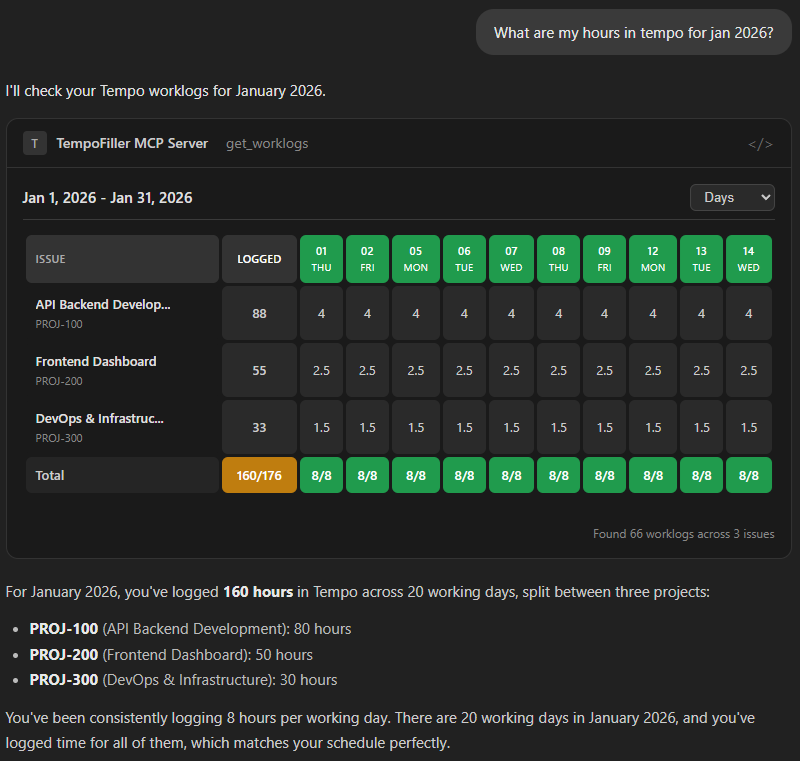
Timesheet Grid - Ask for your logged hours and see them in a pivot table like Tempo’s own UI. Issues as rows, days as columns, color-coded by coverage (green for full days, yellow for under, red for gaps). You can toggle between day/week/month views.
Schedule Calendar - Check your work schedule and see a month grid with working days highlighted. Shows required hours per day, handles holidays, gives you a summary of total capacity.
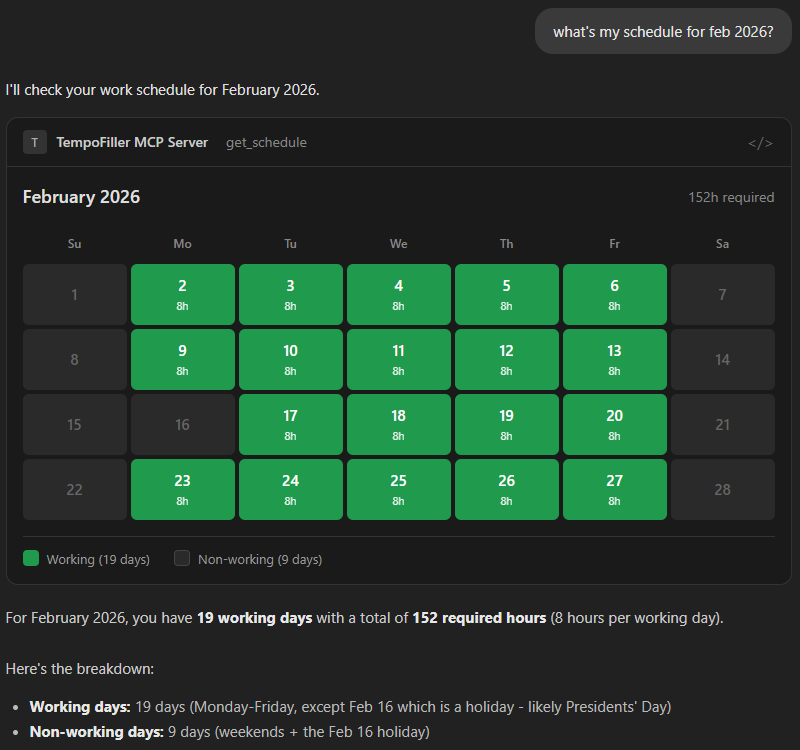
Both render inline in the chat. No browser tabs, no context switching, just ask Claude about your hours and see them visualized right there.
The Implementation
The MCP Apps SDK provides helper functions that handle most of the ceremony. You register your tool with a _meta.ui.resourceUri field pointing to a ui:// resource, then register that resource to serve your bundled HTML.
const resourceUri = "ui://tempofiller/get-worklogs.html";

registerAppTool(server, "get_worklogs", {
  description: "Retrieve worklogs for a date range",
  inputSchema: { /* ... */ },
  _meta: { ui: { resourceUri } }
}, async (params) => {
  const data = await fetchWorklogs(params);
  return {
    content: [{ type: "text", text: JSON.stringify(data) }],
    structuredContent: data
  };
});

registerAppResource(server, resourceUri, resourceUri,
  { mimeType: "text/html;profile=mcp-app" },
  async () => ({
    contents: [{ uri: resourceUri, mimeType: "text/html;profile=mcp-app", text: bundledHtml }]
  })
);
The UI side uses @modelcontextprotocol/ext-apps to receive the tool result:
import { App } from "@modelcontextprotocol/ext-apps";

const app = new App({ name: "Worklogs UI", version: "1.0.0" });

app.ontoolresult = (result) => {
  const data = result.structuredContent || JSON.parse(result.content[0].text);
  renderTimesheetGrid(data);
};

app.connect();
I used Vite with vite-plugin-singlefile to bundle each UI into a self-contained HTML file. The server reads the bundled file and serves it when the host requests the resource.
Gotchas I Hit
The _meta structure matters. I initially tried _meta: { "ui/resourceUri": "..." } but it needs to be nested: _meta: { ui: { resourceUri: "..." } }. Cost me 20 minutes.
Register handlers before connecting. In the UI code, you need to set up app.ontoolresult and other handlers before calling app.connect(). If you connect first, you might miss the initial result.
Stateless mode for testing. The MCP SDK supports stateful sessions but browser-based test hosts can have CORS issues with the session headers. Setting sessionIdGenerator: undefined gives you stateless mode which works better during development.
The basic-host is your friend. The ext-apps repo includes a basic-host example that lets you test UIs in a browser without restarting Claude Desktop. Point it at your HTTP server, call a tool, see your UI render. Iteration cycles dropped to seconds.
Try It
If you use Jira with Tempo, you can try this now:
npx @tranzact/tempo-filler-mcp-server
Or grab the desktop extension bundle for one-click Claude Desktop install.
The development guide documents everything I learned if you want to add MCP Apps to your own server. And if you’re building with Claude Code, point it at the MCP Apps skill file and let it do the heavy lifting.