Building Your Second Brain, Part 2: When AI Moves In
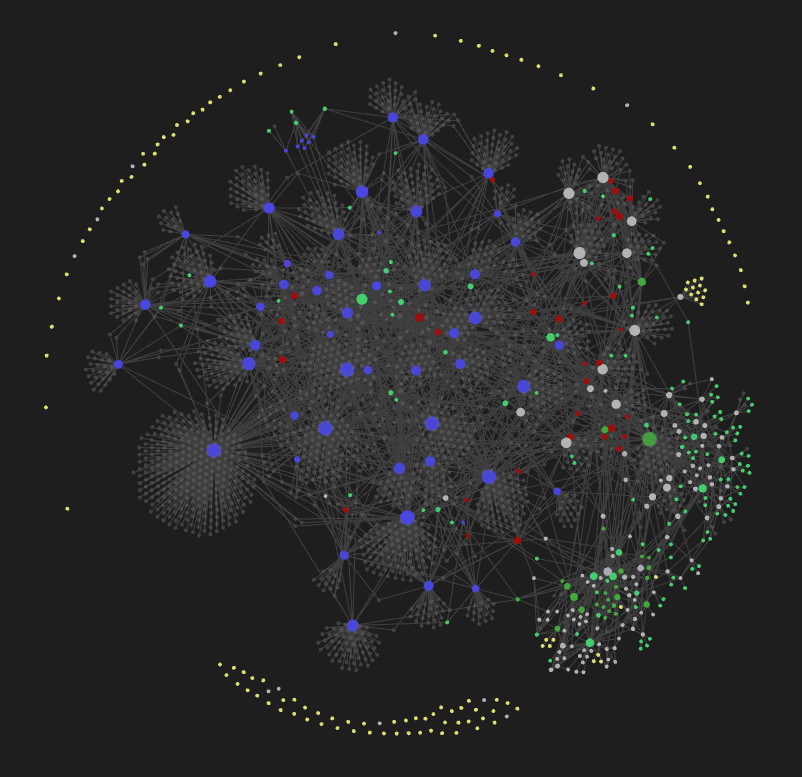
It’s been two months since I moved my second brain from OneNote to Obsidian and I’ve been using it with AI every day since. The system looks nothing like what I started with. I just kept using it, kept hitting friction, and kept fixing things until the friction went away.
In Part 1 I wrote about the migration, getting everything into markdown with YAML front matter and wikilinks so Claude could actually read it. That was step one, making the vault readable.
What happened next is that AI went from reading the vault to operating inside it. The gap between “AI can see my notes” and “AI knows how to work with my notes” turned out to be bigger than I expected, and the practices that closed that gap are what this post is about.
Two Interfaces, One Vault
A second brain used by both a human and an AI needs two interfaces, two genuinely different entry points optimized for how each one operates.
My interface is Obsidian. I open it, I see my GTD Dashboard, I click through linked notes, I look at the graph view to spot clusters and orphans. It’s visual and interactive, built for browsing and following threads.
The AI’s interface is a 35-line routing table called AGENTS.md, a set of search tools, and a folder of CLI scripts. Structured and discoverable, built for reading instructions, searching for context, then acting.
Same vault, same markdown files, same front matter and tags. Two consumers that need completely different entry points. The metadata I write for Dataview queries is the same metadata AI scans with ripgrep. One set of conventions powers both interfaces.
The Human Interface: Obsidian as Operations Center
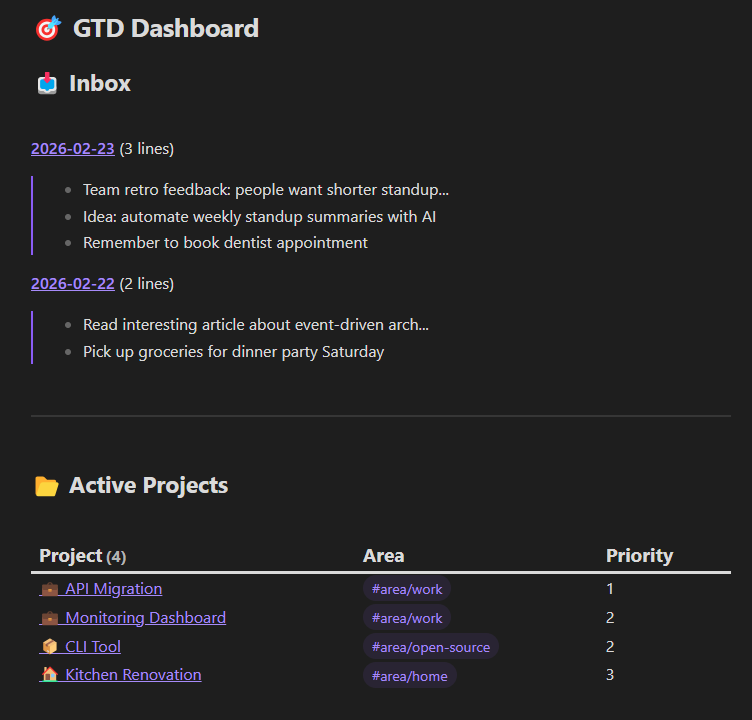
I mentioned the GTD Dashboard briefly in Part 1 but it deserves more attention because it’s how I actually operate day-to-day. It’s one markdown file with Dataview queries that aggregate my entire system into a live view.
The inbox section finds all my daily notes (files named YYYY-MM-DD.md) and shows a line count and preview of each. I can see at a glance how backed up I am, three daily notes sitting there means I’m behind on processing and need to catch up.
Active projects pulls every file tagged #project with status: active in front matter, sorted by priority, showing the area tag so I can see what’s work vs personal vs open-source. Every project in one view without maintaining a separate list:
```dataview
TABLE WITHOUT ID
  file.link AS "Project",
  filter(file.tags, (t) => contains(t, "area/"))[0] AS "Area",
  priority AS "Priority"
FROM #project
WHERE status = "active"
SORT priority ASC
```
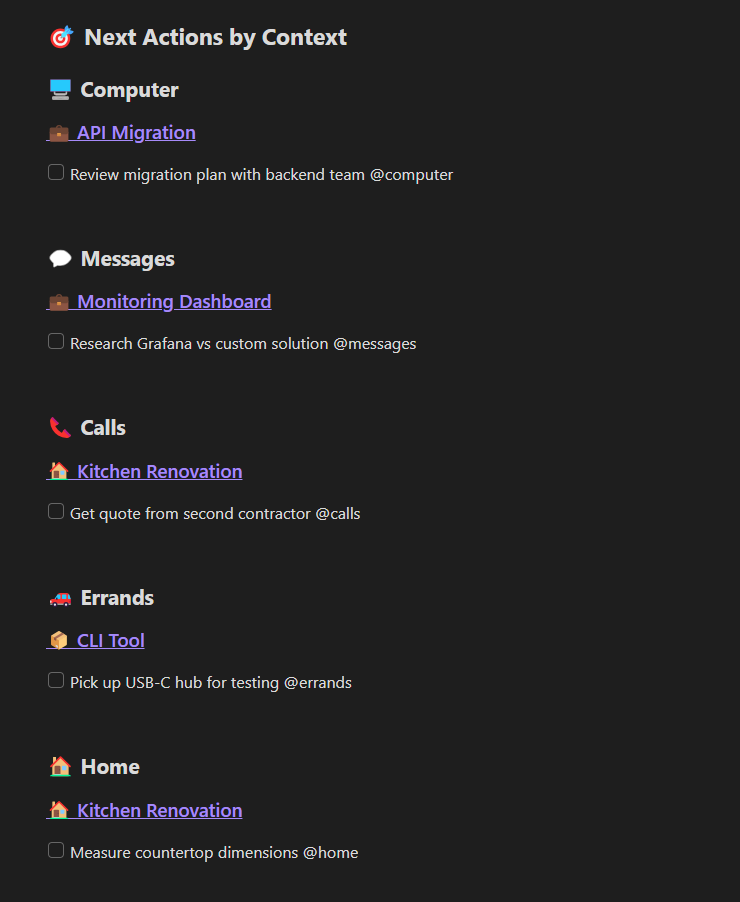
Next actions by context is the one I use most. Six sections, one for each context: @computer, @messages, @calls, @office, @errands, @home. Each one pulls all uncompleted tasks containing that context tag, grouped by source project. When I sit down at my computer I open that section and see everything I can do right now across all projects. When I’m about to run errands I check @errands. The contexts don’t live in a separate system, they’re inline in the task text and Dataview pulls them together:
```dataviewjs
for (const page of dv.pages().sort(p => p.priority ?? 999, 'asc')) {
  const tasks = page.file.tasks.where(t =>
    !t.completed && t.text.includes("@computer") &&
    (!t.scheduled || t.scheduled <= dv.date("today"))
  );
  if (tasks.length > 0) {
    dv.header(4, page.file.link);
    dv.taskList(tasks, false);
  }
}
```
That’s the @computer context. Each other context (@calls, @errands, @home, etc.) is the same query with the tag swapped out.
Someday/Maybe aggregates every #someday-maybe item from across all project files. I’ve got 90+ ideas scattered throughout my vault and they all show up in one list without me maintaining it.
Waiting For catches tasks tagged as waiting or delegated so nothing falls through cracks.
I open one file and see my entire system: projects, tasks, inbox backlog, ideas, delegated items.
The metadata that makes all of this work, tags in YAML front matter, context tags in task text, status fields, priority numbers, is the exact same metadata AI uses to navigate the vault. I built it for my dashboard and AI gets it for free.
Practice 1: AGENTS.md as a Compressed Index
My first version of AGENTS.md was 678 lines. It had everything: GTD methodology, inbox processing workflows, tag conventions, file naming rules, writing guidelines. A comprehensive manual.
It didn’t work. Agents would follow instructions from the first few sections and drift from everything after that. LLMs have a U-shaped attention curve, they remember the beginning and end of long context but lose the middle. A 678-line instruction file means most of the instructions are in the dead zone.
Then I read Vercel’s research on AGENTS.md vs Skills. They tested whether AI agents learn framework knowledge better through on-demand retrieval (Skills) or through a static document always in context (AGENTS.md). The result was 100% pass rate for AGENTS.md vs 79% for skills. In 56% of cases with skills, agents never even invoked the skill, they just skipped it.
So I compressed 678 lines down to 35:
# AGENTS.md

This is an Obsidian vault using GTD methodology.

**CRITICAL: You MUST read the required note BEFORE taking action.** This is not optional.

## Required Reading by Task

| User asks about... | READ THIS FIRST | Then act |
|--------------------|-----------------|----------|
| Tasks, projects, next actions, inbox, GTD | @GTD Vault Guide.md | Query/update vault |
| Jira, GitHub, Confluence, Azure, CLI tools | @CLI Tools.md | Run commands |
| Email, calendar, Teams, OneDrive | @Microsoft Graph PowerShell SDK.md | Run PowerShell |
| Finding related notes, concepts | @Smart Connections MCP.md | Run smart-cli |

**Do not skip this step.** Read the linked note first, then act.
A one-line description, a mandatory routing table, and a rule that says don’t skip the table. The rest of the file is five critical rules and a 5-step workflow, still under 35 lines total.
The routing table is always in context. The detailed guides (GTD Vault Guide is 268 lines) only get loaded when the agent actually needs them. Progressive disclosure: the routing table is always in context, the detailed guides only load when the agent needs them.
Muratcan Koylan built a “Personal Brain OS” with the same architecture independently. His system uses SKILL.md as a routing file that points to module instructions which point to data files. Same three-layer pattern, arrived at separately.
I wrote about giving your AI hills to climb, hard artifacts that constrain AI behavior toward better outcomes. The routing table is exactly that, a hard constraint that forces the agent to read the right documentation before acting. It works because it’s short enough that the agent actually follows it.
Practice 2: Two Modes of Searching Your Vault
AI can read files but it doesn’t know what’s in your vault until it searches. Two search tools cover different needs.
ripgrep for when you know what you’re looking for. ripgrep (rg) is a fast regex search tool. It finds exact terms, file patterns, front matter values. “Find all files with status: active” or “find every task containing @calls” or “which notes mention this specific concept” are all instant with rg. The AI uses it to scan metadata across hundreds of files before reading any content, which is the equivalent of browsing the file system really fast.
Semantic search for when you don’t. Smart Connections is an Obsidian plugin by Brian Petro that generates vector embeddings of your notes. A separate third-party tool called smart-cli (by Jianye Ye) reads those embeddings and exposes semantic search as a command-line tool, so Claude can call it directly without Obsidian running. The difference from rg is that smart-cli matches meaning instead of exact text. Searching for “decision-making under uncertainty” surfaces notes about Stoicism, a GTD weekly review template, and a book highlight from Thinking in Bets, none of which contain that exact phrase. They’re conceptually related and the embeddings catch that.
The two modes complement each other. rg is fast and exact, semantic search finds things you didn’t know were related. When I ask Claude to help me write something, it uses rg to find structured data and smart-cli to discover unexpected connections.
Practice 3: The CLI Tool Ecosystem
The vault holds capability. A scripts/ folder contains CLI tools for the things I do repeatedly: email, calendar, Jira, Confluence, Teams, meeting transcripts. Each one is a small script that wraps an API (Microsoft Graph, Google Workspace, Atlassian) and handles authentication so the AI can just call it.
Most of these tools exist because I needed them once and asked the AI to build them. I needed to search old emails from a specific sender, so we wrote a script for it. I needed to draft a reply without opening Outlook, so we wrote one for that too. The AI writes the script, I review it, and it goes into scripts/. I’ve written about this pattern before with hwinfo-tui and an MCP server, but inside the vault the scripts compound differently because the AI can discover and reuse them.
That’s where the indexing matters. A CLI Tools.md reference file describes every tool available, what it does, and how to invoke it. That file is listed in the AGENTS.md routing table, so when I ask “what did John email me about last week?” the agent reads the tool index, finds the email search script, and runs it. Same progressive disclosure pattern as the routing table itself.
The vault accumulates capability over time. Every script we build becomes a tool the AI can find through the index and use in future sessions. Six months ago I had to open four different apps to prepare for a meeting. Now I ask the AI to prep for one and it chains the tools it already knows about: calendar, emails from attendees, relevant Jira tickets, summary.
Practice 4: Knowledge Integration
I read books, I save articles, I watch videos. Before the vault these lived in separate places: highlights in Kindle, articles in bookmarks, video notes didn’t exist at all. Now they all go through the same integration process and end up connected.
Every external source gets the same treatment:
---
tags: [book]
title: "Book Title"
authors: [Author Name]
date-published: 2019-01-01
---
YAML front matter for structured metadata, key concepts extracted as [[wikilinks]], and a “Connections to Other Ideas” section linking each source to my own writing and to other notes in the vault.
Books get chapter summaries with concepts wikilinked. I’ve got 56 books in the vault, each one contributing concepts to the graph. A highlight about compound growth in Atomic Habits links to [[compound growth]], the same concept note that a chapter in The Psychology of Money links to.
Articles get curated notes with the author’s argument plus my analysis of how it connects to my thinking. I read Peter Naur’s 1985 paper on programming as theory building and wrote notes connecting it to Russ Miles’s essay on cognitive debt from 2026. Same diagnosis 40 years apart, and the vault captures that link.
Videos follow the same format. A Veritasium video about overconfidence and the Dunning-Kruger effect links to [[leadership]] because overconfident individuals gain leadership positions, and that’s the same [[leadership]] concept note that book highlights and article notes link to from completely different angles. Concept notes are small atomic files (leadership.md, compound growth.md, context switching.md) that emerge naturally from all the other sources. The concept note doesn’t hold much content itself, it exists to connect everything that mentions that idea, and books, articles, videos, and my own blog posts all link into it from different angles.
This is where semantic search and the knowledge graph reinforce each other. When I was writing LLMs Are Compaction Tools, and You Are the Algorithm, a semantic search surfaced Naur’s 1985 paper, a book highlight about tacit knowledge, and notes from a conference talk. Three different source types, connected through shared concept notes, all feeding one blog post.
I wrote about how AI accelerates whatever you have. The knowledge graph is the “whatever you have.” A rich, well-connected graph gives AI dozens of sources to pull from when I’m writing or thinking through a problem. A sparse one means generic output.
What Ties It Together
None of these practices were planned. They emerged from using the system daily and noticing friction. The agent couldn’t find what it needed so I added a search tool. It kept forgetting conventions so I compressed the instructions into a routing table. Processes I kept explaining became scripts, and I wikilinked the disconnected knowledge as I went.
Every one of those fixes gave AI something concrete to operate on instead of ambient context, same principle I wrote about in Give Your AI Hills to Climb, applied to personal knowledge management instead of code.
Each practice also makes the others more valuable. AGENTS.md routes to CLI Tools.md, which lists the scripts. Those scripts process knowledge sources that rg and smart-cli can search. That search feeds back into what AGENTS.md routes to, so adding one piece makes everything else more useful.
If you haven’t set up the foundation yet, Part 1 covers the migration to Obsidian, the format decisions, and getting AI access to your vault. Once the vault is readable, the practices in this post are what make it operable.